Summary
Type your text here.

Figure 247 Budget Document > Summary Page > Summary Section > Summary Subsection – Example Layout
Table 119 Budget Document > Summary Page > Summary Section > Summary Subsection – Column Descriptions
|
Column |
Description |
|
<back next> |
Click to scroll through the display of the budget periods (only 5 columns are displayed at a given time due to screen real estate) |
|
Period 1 |
Display of the dollar amount for the Object Code line item in the displayed Budget Period |
|
Period 2 |
Display of the dollar amount for the Object Code line item in the displayed Budget Period |
|
Total |
The total dollar amount for the Object Code line item for all budget periods. This column is the last column displayed on the right. |
Personnel
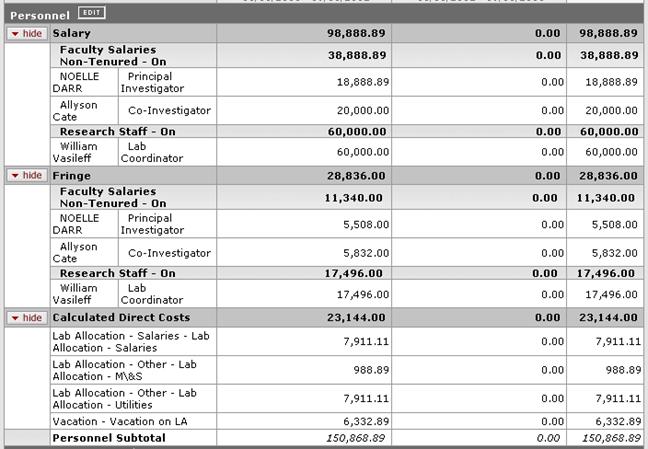
Figure 248 Budget Document > Summary Page > Summary Section > Personnel Subsection – Example
Table 120 Budget Document > Summary Page > Summary Section > Personnel Subsection – Row Descriptions
|
Row |
Description |
|
Personnel |
|


 Edit button: takes you
to this Budget document’s Personnel page.
Edit button: takes you
to this Budget document’s Personnel page.Non-Personnel
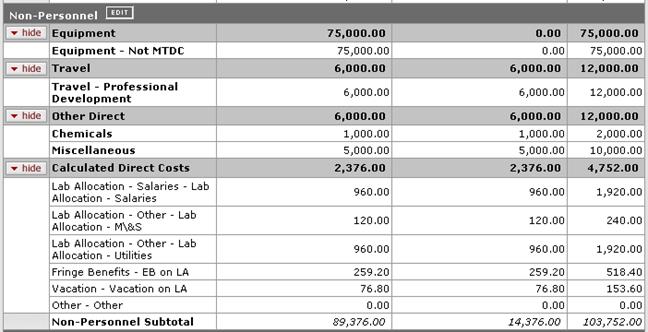
Figure 249 Budget Document > Summary Page > Summary Section > Non-Personnel Subsection – Example
Table 121 Budget Document > Summary Page > Summary Section > Non-Personnel Subsection – Row Descriptions
|
Row |
Description |
|
Non-Personnel |
|
 Click the EDIT button to navigate to
the Non-Personnel page of the Budget document to modify these
values. Expandable subsections may include Equipment, Travel, Other
Direct, Calculated Direct Costs, and a Non-Personnel Subtotal is
displayed.
Click the EDIT button to navigate to
the Non-Personnel page of the Budget document to modify these
values. Expandable subsections may include Equipment, Travel, Other
Direct, Calculated Direct Costs, and a Non-Personnel Subtotal is
displayed.Totals

Figure 250 Budget Document > Summary Page > Summary Section > Totals Subsection – Example